
FreeBSD jails: extending the jls command
First published on pushpanel.io as “FreeBSD Jails: extending jls command”. The domain is no longer ours, so links to it were removed and the headline rewritten for this site; the text of the post is unchanged.
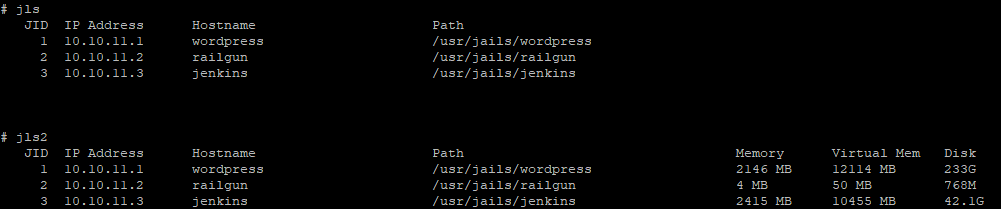
JLS is a very useful tool about getting information about jails, unfortunately, it delivers only parameters of the jails that were defined.
The jls utility lists all active jails, or the specified jail.  Each jail
     is represented by one row which contains space-separated values of the
     listed parameters, including the pseudo-parameter all which will show all
     available jail parameters.  A list of available parameters can be re-
     trieved via "sysctl -d security.jail.param".  See jail(8) for a descrip-
     tion of some core parameters.
I was looking for a tool that would provide real-time information about running jails. The basic command that provides information might be ‘ps -J <jailname>’ But I wanted to have this under one script.
#!/usr/local/bin/bash

printf "   %-4s %-15s %-28s  %-36s  %-10s  %-12s  %-10s\n"       "JID"  "IP Address" "Hostname" "Path" "Memory" "Virtual Mem" "Disk"
for JID in `jls | grep -v JID | awk '{print $1}'`
do
a=`jls -j $JID | sed 1d`
b=`ps -J $JID -o rss | awk '{rss += $1} END {print rss}'`
v=`ps -J $JID -o vsz | awk '{cpu += $1} END {print cpu}'`
m=`jls -j $JID | sed 1d | awk '{print $4}'`
d=`zfs list -H -o used $m`

printf "%-90s  %-10s  %-12s  %-10s\n" "$a" "$(( ${b%% *} / 1024)) MB" "$(( ${v%% *} / 1024)) MB" "$d"
done
Download from git https://github.com/spagu/jls2/blob/master/jls2.sh