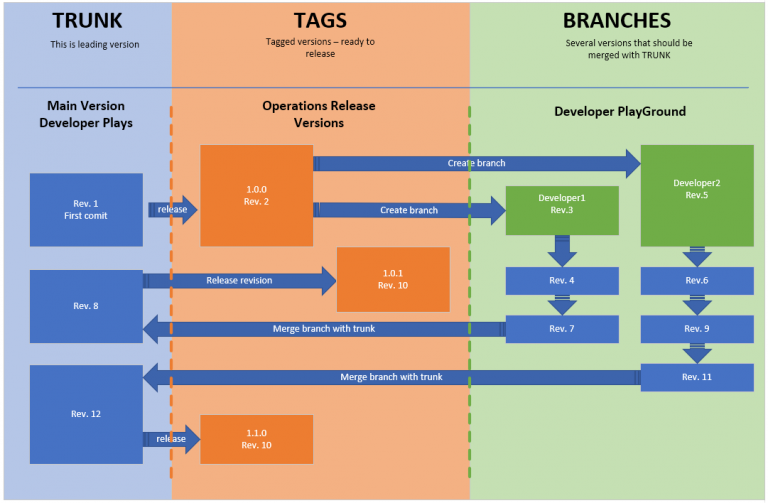
A release process built on trunk, tags and branches
First published on pushpanel.io as “Software release process with repository trunk tags and branches”. The domain is no longer ours, so links to it were removed and the headline rewritten for this site; the text of the post is unchanged.
Repository folder structure
- tags
- branches
- trunk
What is TRUNK/?
Is the latest code major code folder. The developer can commit code from their branches. The code is subject for testing before going to be released.
What are TAGS/ and we need them?
Operations receive an automated signal that a new code version is in TRUNK so they can start the process of testing of latest trunk revision. If tests complete positive they need to discuss with business when it is the best time to release a new version, make a risk assessment. Also, they set up a human-readable version on a revision tag. The code is getting tagged then released to the public.
What are BRANCHES/ and how we use them?
Branches are developers space that they copy the code from trunk (or branch). Then they can develop new features and functionality to the software inside their own branch. Once they test it they can start the merging process with Trunk. Usually, it is a senior developer who proceeds with merger action.