
Trigger a Jenkins job from Bitbucket Pipelines
First published on pushpanel.io as “How to trigger a Jenkins Remote job using pipelines in BitBucket with parameters”. The domain is no longer ours, so links to it were removed and the headline rewritten for this site; the text of the post is unchanged.

So I have a situation where I need to trigger a simple job for calculating data on a package. BitBucket pipelines take too much time to complete so it was a good idea to place that job on external Jenkins server. Information that this job requirement is a ${bitbucket_commit} and this needs to be passed through. Forget Webhooks.
Pre-requirements:
- Jenkins Server
- Access to a Bitbucket repository
Steps:
Install two plugins to a Jenkins server that would allow triggering anonymously a job:
Create a job inside a Jenkins.
- Enable a Build Trigger

- Make build parametrised
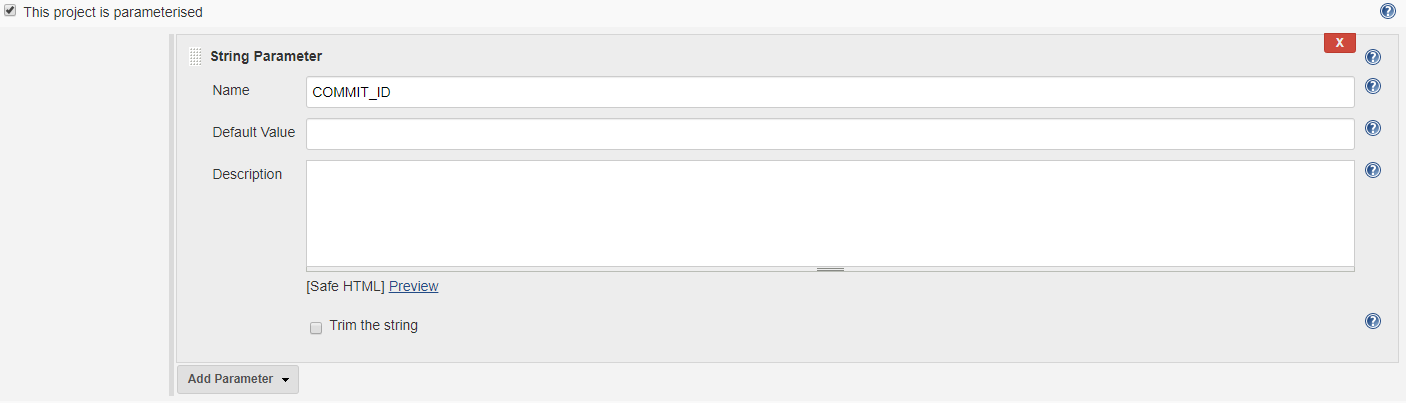
- Execute shell Commit
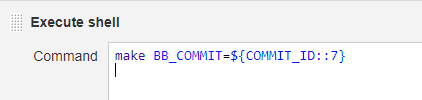
*Downloading repository archive notes:
Use short (12 characters) version of commit_hash in BUILD script if you need to download zip file etc like https://bitbucket.org/<COMPANY>/<REPOSITORY>/get/<COMMIT_ID::12>.zip (you can use a long hash to download but after unzip folder would be in short hash )
EDIT: $(echo $COMMIT_ID | cut -c1-12)
- Enable a Build Trigger
Make sure your BitBucket can speak with your Jenkins ( Firewall )
Create a pipeline inside BitBucket /bitbucket-pipelines.yml
pipelines:
default:
   - step:
      name: Trigger Build
      script:
         - curl "https://<YOURJENKINS>.com/jenkins/buildByToken/buildWithParameters?job=<YOUR JOB NAME>&COMMIT_ID=${BITBUCKET_COMMIT}&token=<YOUR TOKEN>"